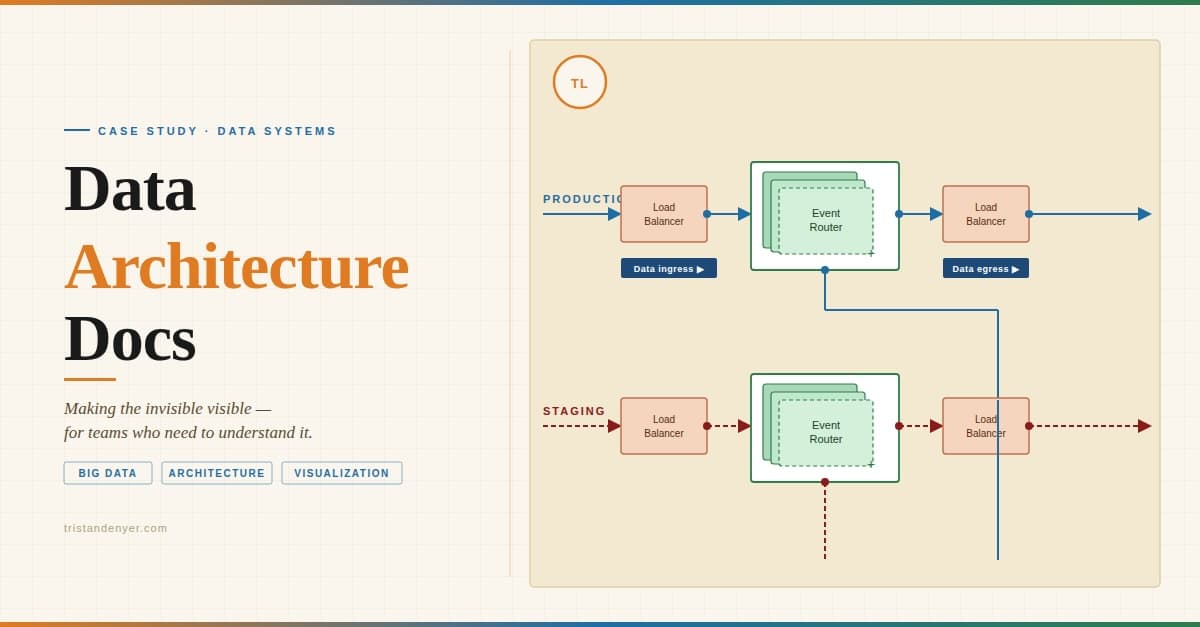
In Next.js, NEXT_PUBLIC_ is the prefix that marks an environment variable as intentionally exposed to the browser. Variables without that prefix are meant to stay on the server. (See Next.js docs)
This post is not about misusing that prefix, or even how to use it properly. A lot of us have gotten the alert from GitHub and had to spend time we do not have rotating secrets. By the time that alert arrives, the credential is in the production bundle, the CDN cache, and visitors' browser network tabs. According to GitGuardian's 2026 State of Secrets Sprawl report, 28.6 million secrets were added to public GitHub commits in 2025 alone, a 34% year-over-year increase, and 64% of valid secrets leaked in 2022 had still not been revoked by 2026. Rotating credentials after the fact is necessary but not sufficient. The blast radius also needs to be assessed, access logs audited, and the structural cause fixed so the same mistake does not ship again.
That is why I built @snytch/nextjs. A quick scan beats hours of remediation work and a hotfix on a Friday afternoon.
Why the boundary is easier to cross than you think
Before getting into the tool, it is worth understanding the three structural failure modes Snytch was built to address. Each one is subtle enough to pass most code reviews.
Failure mode 1: The shared utility import
// lib/stripe.ts (no 'use client' directive, looks server-safe)
import Stripe from "stripe";
export const stripe = new Stripe(process.env.STRIPE_SECRET_KEY!);

// components/checkout-button.tsx
("use client");
import { stripe } from "../lib/stripe"; // entire module now in client bundle
No warning. No error. The build succeeds and STRIPE_SECRET_KEY is now a public string in the JavaScript bundle.
The fix is import 'server-only' at the top of lib/stripe.ts. This causes Next.js to throw a build error if the file is ever imported from client-side code. But it requires manually adding that import to every file that should be protected, and most developers are not aware it exists.
// lib/stripe.ts — protected
import "server-only";
import Stripe from "stripe";
export const stripe = new Stripe(process.env.STRIPE_SECRET_KEY!);
Failure mode 2: NEXT_PUBLIC_ is not a flag; it is a find-and-replace
NEXT_PUBLIC_ does not mark a variable as "accessible on the client at runtime." It is a compile-time substitution. During next build, Next.js finds every reference to process.env.NEXT_PUBLIC_WHATEVER in your codebase and replaces it with the literal value as a hardcoded string in the output JavaScript.
The consequence: rotating a leaked NEXT_PUBLIC_ secret in a hosting platform's dashboard does not remove it from the live bundle. The old value is baked into every JavaScript file the CDN has already cached. A full rebuild and redeploy is required, followed by a CDN cache invalidation, for the rotation to take effect.
Failure mode 3: Props passed from Server Components to Client Components are serialized
This one is specific to the App Router.
// app/dashboard/page.tsx (Server Component)
const config = await getInternalConfig() // returns service URLs, tokens, flags

// Everything passed as props is serialized over the wire to the client
return <Dashboard config={config} />
Whatever is passed as props crosses the network boundary as serialized JSON. If config contains internal service URLs, tenant tokens, or anything that should stay server-side, it is now in the client's possession. The fix is to be explicit: pass only the fields the Client Component actually needs, nothing more.
All three of these failure modes share a common trait: the build passes, the tests pass, and there is no visible indication anything went wrong.
Introducing @snytch/nextjs
@snytch/nextjs is a CLI tool for secret leak detection in Next.js projects. It requires Node.js 18 or later.
Three commands address the most common leak vectors in a Next.js project:
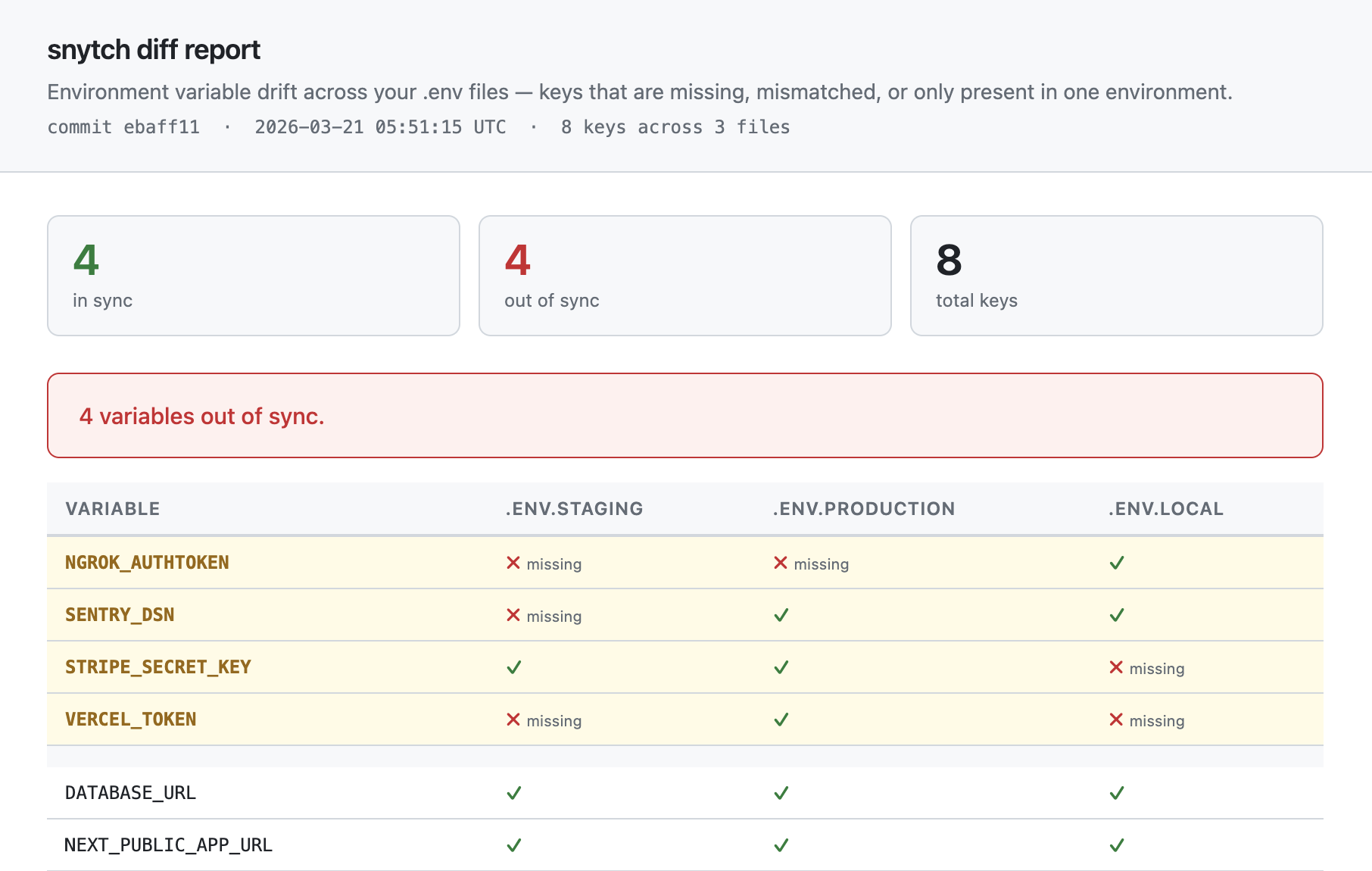
snytch scan: scans compiled JavaScript bundles and related build artifacts for leaked secrets using 240+ detection patternssnytch check: reads.envfiles and flagsNEXT_PUBLIC_variables whose values look like credentialssnytch diff: compares key presence across multiple.envfiles to surface configuration drift between environments
There is also a snytch all command that runs all three in sequence, and a snytch demo that generates synthetic findings across all three commands so you can see the output format before pointing it at a real project.
How snytch scan works
The scanner runs four passes. Each one builds on the last.
snytch scan
    │
    ├── Discover build artifacts (six surfaces)
    │   .next/static/chunks/*.js          (client JS bundles)
    │   .next/static/chunks/*.js.map      (source maps)
    │   .next/server/pages                (__NEXT_DATA__ blocks in HTML)
    │   next.config.js env block          (values injected at build time)
    │   .next/server/middleware.js         (compiled edge middleware)
    │   .next/trace (opt-in via --graph)  (module dependency graph)
    │
    ├── Pass 1: Pattern Matching
    │   240+ regex patterns
    │   AWS, Stripe, GitHub, JWTs,
    │   database URLs, AI API keys...
    │   Deduplicates per file
    │
    ├── Pass 2: Value Matching
    │   Loads snytch.config.js
    │   Resolves serverOnly vars from .env
    │   Searches literal values in bundle
    │   severity: critical
    │
    ├── Pass 3: Git Context
    │   chunk file → build manifest
    │   → page route → source file
    │   → import chain
    │   → git log → introducing commit
    │   → author, hash, date, message
    │
    └── Pass 4: AI RCA (optional — set ANTHROPIC_API_KEY or OPENAI_API_KEY)
        What leaked / When / How
        Concrete fix + code example
        Editor prompts for Cursor / Windsurf
Pass 1: Pattern matching
Snytch reads every .js and .css file under .next/static/chunks, source maps, __NEXT_DATA__ blocks, the next.config.js env block, and compiled edge middleware, running each against 240+ regular expressions. The patterns cover credential formats drawn from real-world leak research:
- AWS access keys (
AKIA...) and session tokens - Stripe, Square, PayPal, Braintree, and Coinbase keys
- Database connection strings: PostgreSQL (
postgres://), MySQL (mysql://), MongoDB (mongodb+srv://), Redis, Neon, Turso - GitHub, GitLab, and Bitbucket tokens (classic and fine-grained)
- Slack, Discord, Twilio, SendGrid, Mailgun, Postmark tokens
- Private keys: RSA, EC, DSA, OpenSSH, and PGP, identified by their PEM header patterns
- JWT tokens and high-entropy bearer tokens
- Cloud provider credentials: GCP, Azure, Firebase, Cloudflare, Vercel, DigitalOcean
- AI and ML API keys: OpenAI, Anthropic, Cohere, Hugging Face, Pinecone, Mistral, Groq
- Auth providers: Clerk, Supabase, Auth0, Okta
- Observability tools: Datadog, New Relic, Sentry, Splunk, Grafana
- Secret managers: Doppler, 1Password, Infisical, HashiCorp Vault
Each match is deduplicated per file so a single leaked credential does not generate dozens of identical findings from a minified bundle.
Pass 2: Value matching
Pattern matching catches known credential formats. Value matching catches project-specific secrets: custom internal tokens, opaque database passwords, and proprietary API credentials that do not resemble any standard format.
Define a snytch.config.js at the project root:
// snytch.config.js
export default {
  serverOnly: ["DATABASE_URL", "STRIPE_SECRET_KEY", "NEXTAUTH_SECRET"],
};
Snytch resolves the current values of those variables from .env files or process.env and searches for them literally across the compiled bundle. A match at this stage is always reported as a critical finding.
One important security note: Snytch reads these values from the local environment for comparison purposes only. They are never logged in full, never written to the report, and never transmitted to any external service. Findings display truncated previews: the first eight characters of a matched value followed by •••.
Pass 3: Git context
A finding that says "this secret is in chunks/pages/dashboard-abc123.js" is not actionable. Pass 3 traces the finding back to its origin:
.next/static/chunks/pages/dashboard-abc123.js
    └── build-manifest.json lookup
            └── page route: /dashboard
                    └── source file: src/pages/dashboard.tsx
                            └── import chain: lib/stripe.ts, utils/config.ts
                                    └── git log --follow src/lib/stripe.ts
                                            └── hash: a3f9c12
                                                author: Angela
                                                date: 3 weeks ago
                                                message: feat: add stripe integration
The output points directly to the introducing commit, the author, and the import chain. The fix can be made at the structural level rather than simply rotating a credential.
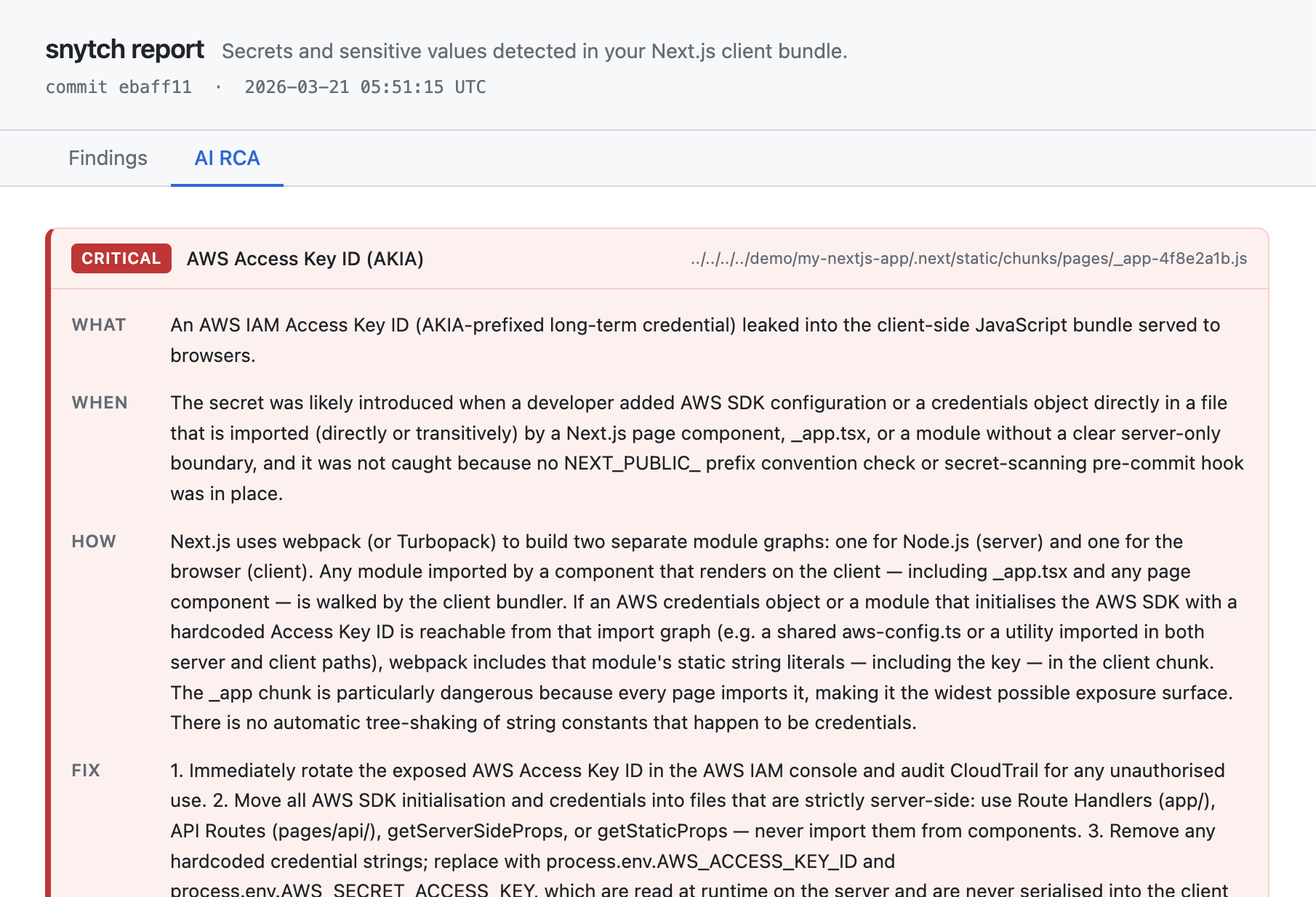
Pass 4: AI root cause analysis
With --report and an API key configured in the environment (set separately, not inline; more on this below), Snytch sends the finding metadata to Claude or GPT-4o and returns a structured root cause analysis:
- What leaked: one sentence describing the specific finding
- When: the introducing commit, author, and relative timestamp
- How: the structural reason the bundler included the value in client code
- Fix: specific code changes, not generic advice to rotate credentials
- Code example: a before/after TypeScript snippet ready to apply
- Editor prompts: pre-written prompts for Cursor or Windsurf to apply the fix directly in the editor
The AI receives the variable name, file path, import chain, and git commit message. It never receives the secret value itself. Snytch redacts before sending.
Getting started
@snytch/nextjs requires Node.js 18 or later.
Install as a dev dependency:
npm install -D @snytch/nextjs
Build the project first. Snytch scans compiled output, not source files:
npm run build
Run the first scan using the npm script:
npm run snytch:scan
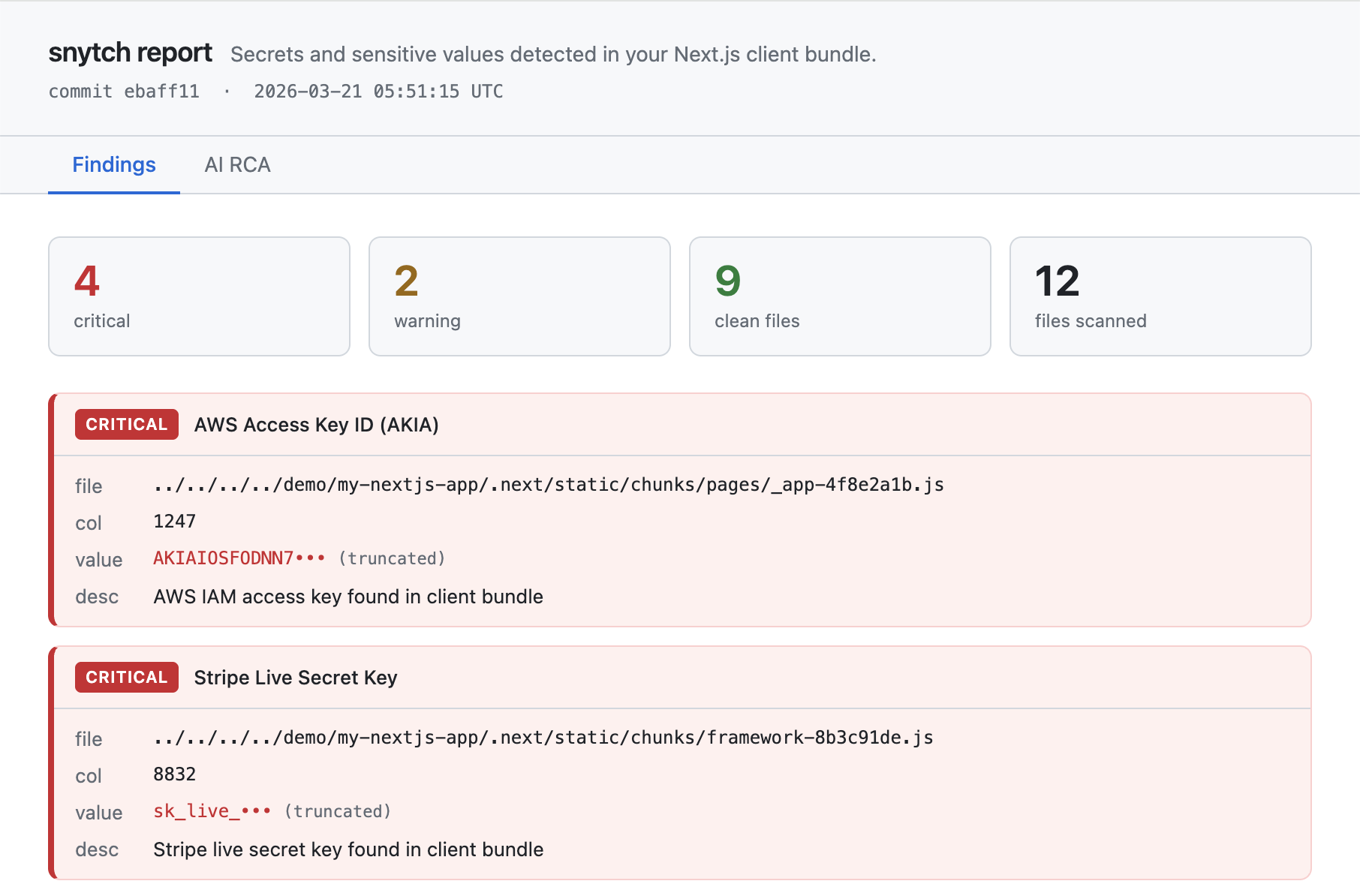
Not ready to build? The demo command runs without a compiled bundle and generates synthetic findings across all three commands, writing three HTML reports to ./snytch-reports/. Since it is a one-off command that does not require the package to be installed first, npx is appropriate here:
npx @snytch/nextjs demo
Add snytch-reports/ to your .gitignore to avoid committing generated reports:
echo "snytch-reports/" >> .gitignore
Configuring serverOnly variables
Create snytch.config.js in the project root. The file must use ESM syntax:
// snytch.config.js
export default {
  serverOnly: [
    "DATABASE_URL",
    "STRIPE_SECRET_KEY",
    "NEXTAUTH_SECRET",
    "OPENAI_API_KEY",
    "RESEND_API_KEY",
  ],
  envFiles: [".env", ".env.local", ".env.staging", ".env.production"],
  failOn: "critical", // 'critical' | 'warning' | 'all'
};
Running the commands
# Run all three commands in sequence
npm run snytch

# Scan the compiled bundle for leaked secrets
npm run snytch:scan

# Flag NEXT_PUBLIC_ variables in .env files that look like credentials
npm run snytch:check

# Compare key presence across environments (key names only, values are never compared)
# Configure env file paths in snytch.config.js, then:
npm run snytch:diff
Suppression rules
Not every finding requires immediate action. Some findings are known-safe and need to be documented rather than fixed. snytch.config.js supports a suppress array for this purpose:
// snytch.config.js
export default {
  serverOnly: ["DATABASE_URL", "STRIPE_SECRET_KEY"],
  suppress: [
    {
      pattern: "JWT Token",
      reason: "Internal session token, not a credential. Reviewed 2026-03-21.",
      addedBy: "@alice",
      until: "2026-09-01",
    },
    {
      pattern: "JWT Token",
      filePath: "chunks/auth",
      reason:
        "Auth module session token, confirmed safe. Other JWT findings remain active.",
      addedBy: "@bob",
    },
  ],
};
Each suppression rule requires a reason. The addedBy and until fields are optional but strongly recommended: addedBy tells the team who to ask about the decision, and until ensures the rule is revisited rather than forgotten. Rules with expired until dates are never silently dropped. They surface as warnings in the terminal and the report.
The optional filePath is a substring match against the finding's file path, letting you suppress a finding in one specific file rather than everywhere. All fields are AND-matched: a rule with both pattern and filePath only suppresses findings that match both.
Enabling AI RCA reports: the right way
Never pass API keys as inline environment variable prefixes on the command line. That pattern writes the credential to shell history in plaintext.
# Avoid this: it writes ANTHROPIC_API_KEY to shell history in plaintext
ANTHROPIC_API_KEY=sk-ant-... snytch scan --report

# Correct: set the key in the shell session first, then run the command
export ANTHROPIC_API_KEY=sk-ant-...
npm run snytch:report
A more durable approach is to use a secrets manager like 1Password CLI, Doppler, or direnv to inject the key into the shell environment from an encrypted store, without it ever appearing in shell history or a config file.
In a pipeline environment, use the platform's built-in secrets store: GitHub Actions secrets, Vercel environment variables, or equivalent. Never hardcode API keys in workflow files.
Both Anthropic (Claude) and OpenAI (GPT-4o) are supported via the --ai-provider flag:
export OPENAI_API_KEY=sk-...
npm run snytch:report -- --ai-provider openai
AI prompts: put this into action right now
These prompts should work well in Cursor, Windsurf, Claude, or any AI coding assistant. They are starting points; adjust them to match the specific files and variable names in the project.
Prompt 1: Audit a codebase for the three failure modes
Audit this Next.js codebase for server/client boundary violations that could
cause secrets to leak into the client bundle. Look for three things:

1. Files that reference process.env variables without a NEXT_PUBLIC_ prefix
   and are also imported by any component that has the 'use client' directive.

2. Variables in any .env file that use the NEXT_PUBLIC_ prefix and whose
   values look like credentials: database connection strings, API keys,
   tokens, or private key content.

3. Server Components in the App Router that pass full data objects as props
   to Client Components, where those objects might contain values that
   should stay server-side.

For each finding, provide: the file path, the specific line, which failure
mode it represents, and the recommended fix. Do not output any actual
secret values — describe what type of value is involved instead.
Prompt 2: Add server-only protection to server-side files
Review this Next.js project and identify all files in /lib, /utils,
/services, and /config that meet any of these criteria:
- They import from server-side SDKs like 'stripe', 'openai',
  '@anthropic-ai/sdk', '@prisma/client', or similar
- They reference process.env variables not prefixed with NEXT_PUBLIC_
- They should never be callable from a browser context

For each file identified, add `import 'server-only'` as the first line.
Explain the reason for each addition.

For any files that are currently used in both server and client contexts,
flag them separately. Those files need to be split — the server-only
logic extracted into a new file, and only the client-safe parts remaining
in the shared file.
Prompt 3: Fix a specific bundle leak
Snytch found a secret leaking into the Next.js client bundle:
  Variable: [VARIABLE_NAME]
  Found in: [FILE_PATH]
  Import chain: [CLIENT_COMPONENT_FILE] imports from [SOURCE_FILE]

Refactor this so [VARIABLE_NAME] never reaches client-side code:

1. Add `import 'server-only'` to [SOURCE_FILE] to prevent future imports
   from client code.
2. If [CLIENT_COMPONENT_FILE] needs server-side functionality, replace
   the direct import with a Server Action or a call to a Route Handler
   that keeps the secret on the server.
3. If [CLIENT_COMPONENT_FILE] only needed a non-sensitive utility from
   [SOURCE_FILE], extract that utility into a separate file without the
   secret dependency.

Show the complete before and after for every file that changes.
Prompt 4: Audit .env files for dangerous NEXT_PUBLIC_ usage
Review all .env files in this project (.env, .env.local, .env.staging,
.env.production). For every variable prefixed with NEXT_PUBLIC_, evaluate:

1. Does the value appear to be a credential, token, connection string,
   or high-entropy string? If so, flag it as a potential exposure.

2. Does the variable name suggest it is server-only — for example,
   DATABASE_URL, anything containing _SECRET_, _PRIVATE_, or _KEY
   without a clear indication it is meant to be public? Flag it regardless
   of the value format.

3. For variables that are genuinely safe to be public — app names, public
   API base URLs, analytics IDs, feature flags containing no sensitive data
   — confirm they are appropriate for the NEXT_PUBLIC_ prefix.

Present results as a table: variable name | current prefix | assessed risk
level | recommendation.
Do not include any actual secret values in the output.
CI/CD integration
Running Snytch locally during development is a good habit. Running it in a pipeline is what makes it a reliable security gate, one that runs on every push and every pull request without depending on any individual developer remembering to run it.
GitHub Actions
# .github/workflows/snytch.yml
name: snytch secret scan

on:
  push:
    branches: [main, develop]
  pull_request:

jobs:
  scan:
    runs-on: ubuntu-latest
    steps:
      - uses: actions/checkout@v4
        with:
          # fetch-depth: 0 is required for Pass 3 (git context).
          # The default shallow clone truncates history and produces
          # empty git context in scan results.
          fetch-depth: 0

      - uses: actions/setup-node@v4
        with:
          node-version: 20
          cache: npm

      - name: Install dependencies
        run: npm ci

      - name: Build
        run: npm run build

      - name: Scan bundle for leaked secrets
        run: npx @snytch/nextjs scan --json > snytch-results.json
        env:
          # ANTHROPIC_API_KEY is optional.
          # Omit it for a fast scan without AI RCA.
          ANTHROPIC_API_KEY: ${{ secrets.ANTHROPIC_API_KEY }}

      - name: Check NEXT_PUBLIC_ prefix misuse
        run: npx @snytch/nextjs check --json >> snytch-results.json

      - name: Write env files from secrets
        # Required for the diff step.
        # Never commit .env files to the repository.
        run: |
          echo "${{ secrets.ENV_STAGING }}" > .env.staging
          echo "${{ secrets.ENV_PRODUCTION }}" > .env.production

      - name: Check environment drift
        run: |
          npx @snytch/nextjs diff \
            --env .env.staging \
            --env .env.production \
            --json >> snytch-results.json

      - name: Upload scan results
        if: always()
        uses: actions/upload-artifact@v4
        with:
          name: snytch-results
          path: snytch-results.json
          retention-days: 30

      - name: Comment on PR if critical findings exist
        if: failure() && github.event_name == 'pull_request'
        uses: actions/github-script@v7
        with:
          script: |
            const fs = require('fs');
            const results = JSON.parse(
              fs.readFileSync('snytch-results.json', 'utf8')
            );
            const criticals = results.findings?.filter(
              f => f.severity === 'critical'
            ) ?? [];
            if (criticals.length === 0) return;
            const lines = [
              '## snytch detected critical findings',
              '',
              '| Severity | Finding | File |',
              '|---|---|---|',
              ...criticals.map(f =>
                `| ${f.severity} | ${f.message} | \`${f.file}\` |`
              ),
              '',
              'Run `npm run snytch:report` locally for the full RCA.',
            ];
            await github.rest.issues.createComment({
              issue_number: context.issue.number,
              owner: context.repo.owner,
              repo: context.repo.repo,
              body: lines.join('\n'),
            });
Two notes on this workflow:
fetch-depth: 0 on the checkout step is required. Pass 3 runs git log --follow to trace the introducing commit. Without full history, git context comes back empty.
The ANTHROPIC_API_KEY secret is optional. The scan, check, and diff commands all work without it. The AI RCA tab in the HTML report shows a placeholder when no key is available.
The "Write env files from secrets" step is required before snytch diff. .env files should never be committed to a repository. The correct approach is to write them from pipeline secrets immediately before the diff step runs, then allow the runner to discard them when the job completes.
GitLab CI
# .gitlab-ci.yml
snytch:
  stage: test
  image: node:20
  before_script:
    - npm ci
    - npm run build
    - echo "$ENV_STAGING" > .env.staging
    - echo "$ENV_PRODUCTION" > .env.production
  script:
    - npx @snytch/nextjs scan --fail-on critical
    - npx @snytch/nextjs check --fail-on critical
    - npx @snytch/nextjs diff --env .env.staging --env .env.production
  artifacts:
    when: always
    paths:
      - snytch-results.json
    expire_in: 30 days
  variables:
    # Store in GitLab pipeline variables settings, not here
    ANTHROPIC_API_KEY: $ANTHROPIC_API_KEY
Vercel build hook
To block deploys on critical findings without a separate pipeline, add a post-build script to package.json:
{
  "scripts": {
    "build": "next build",
    "postbuild": "npx @snytch/nextjs scan --fail-on critical"
  }
}
Vercel runs postbuild automatically after next build. A non-zero exit code cancels the deploy.
Pre-commit hook: stop it before it commits
CI catches problems before they are deployed. A pre-commit hook catches them before they are committed at all. The two are complementary and neither replaces the other.
# Install Husky if the project does not already use it
npm install -D husky
npx husky init

# Add the pre-commit hook
echo 'npx @snytch/nextjs check --fail-on critical' > .husky/pre-commit
chmod +x .husky/pre-commit
For lint-staged users:
// lint-staged.config.js
export default {
  "*.{env,env.*}": ["npx @snytch/nextjs check --fail-on critical"],
};
The pre-commit hook catches NEXT_PUBLIC_ prefix mistakes before they enter the repository. CI catches the more subtle bundle leak that can happen even when prefixes are correct. Both are necessary because they catch different things.
Editor integration via MCP
Model Context Protocol (MCP) is an open standard that allows AI coding assistants to call external tools during a conversation. When Snytch is connected as an MCP server, an AI assistant in Cursor, Windsurf, or Claude Desktop can run scans, read the structured results, open affected files, and propose fixes, all within a single editor session.
// .cursor/mcp.json
// Windsurf: ~/.codeium/windsurf/mcp_config.json
// Claude Desktop: ~/Library/Application Support/Claude/claude_desktop_config.json
{
  "mcpServers": {
    "snytch": {
      "command": "npx",
      "args": ["-y", "@snytch/nextjs", "mcp"]
    }
  }
}
Once connected, the AI assistant has access to three callable tools: snytch_scan, snytch_check, and snytch_diff. It can run a scan, read the structured JSON results, navigate to the affected source file, propose a structural fix, and verify the fix resolved the finding, without leaving the editor.
Secret values never pass through the MCP layer. All matched values are redacted to truncated previews before results are returned to the model.
Layering defenses: where Snytch fits
Secret leak prevention is not a single-tool problem. Different tools catch different things at different stages. The table below shows where Snytch fits alongside the other tools worth having in a Next.js project:
| Stage | Tool | What it catches |
|---|---|---|
| Commit | snytch check via Husky |
NEXT_PUBLIC_ prefix misuse in .env files |
| Commit | Gitleaks / GitHub push protection | Hardcoded secrets in source files |
| Build | snytch scan in CI |
Secrets baked into compiled client JavaScript |
| Deploy | snytch scan via postbuild |
Same as above, blocks the Vercel deploy |
| Drift | snytch diff in CI |
Credentials missing from one environment but not another |
| Dependencies | Socket.dev / Snyk | Malicious or vulnerable npm packages |
| Runtime | Doppler / Infisical / Vault | Secure secret injection at runtime |
Snytch covers the post-build bundle scanning layer: the gap between a clean-looking source tree and what actually shipped to the browser. Each other row in that table addresses a different attack surface.
What Snytch does not do
Snytch does not prevent anyone from writing NEXT_PUBLIC_STRIPE_SECRET_KEY. It detects the result of that choice after the build, before the deploy.
Snytch does not enforce server/client boundaries at the framework level. The server-only package does that. Snytch identifies which files need it.
Snytch does not replace rotating a compromised credential. If a scan finds a secret in the bundle, the credential needs to be rotated immediately. Snytch helps identify the structural fix that prevents the same secret, or the next one, from leaking again.
Snytch does not scan source files for hardcoded secrets. That is the job of Gitleaks, TruffleHog, or GitHub's built-in push protection.
Snytch does not protect against malicious or compromised npm packages. Socket.dev and Snyk address that class of threat.
What Snytch does: makes the post-build, pre-deploy moment a security checkpoint, with enough context in the results to fix the root cause rather than just the symptom.
Try it
# Install as a dev dependency (requires Node.js 18+)
npm install -D @snytch/nextjs

# Build the project
npm run build

# Run the scan
npm run snytch:scan

# See the output format without running a build
# (npx is appropriate here — this is a zero-install preview)
npx @snytch/nextjs demo

# Generate the full HTML report with AI RCA
# Set the API key in the shell session first
export ANTHROPIC_API_KEY=sk-ant-...
npm run snytch:report
Source code, open issues, and the contribution guide are at github.com/tristandenyer/snytch-nextjs.
At the time of writing this is a beta release. If Snytch finds something unexpected, whether a false positive, a missed pattern, or a confusing error message, opening an issue is genuinely useful. The patterns library and edge case handling both improve through real-world use, and feedback from developers running it against actual production codebases is what makes that happen.